Set up Dependabot to automatically update project dependencies on GitLab
Dependabot updates the dependencies of software projects automatically. It works with open source projects on GitHub, and you can run your own instance of it on a private GitLab instance.
Dependabot updates the package dependencies of a project as soon as a new version is released. It supports a lot of languages. Docker, PHP, JavaScript, Elixir and Go are the relevant ones for us at Sourceboat.
Once Dependabot is set up for a project, it checks the configured dependencies for updates at fixed intervals. For JavaScript it reads the package.json, for PHP the composer.json, and for Docker it compares the FROM statement in the Dockerfile with Docker Hub. If there’s an update, it creates a merge request.
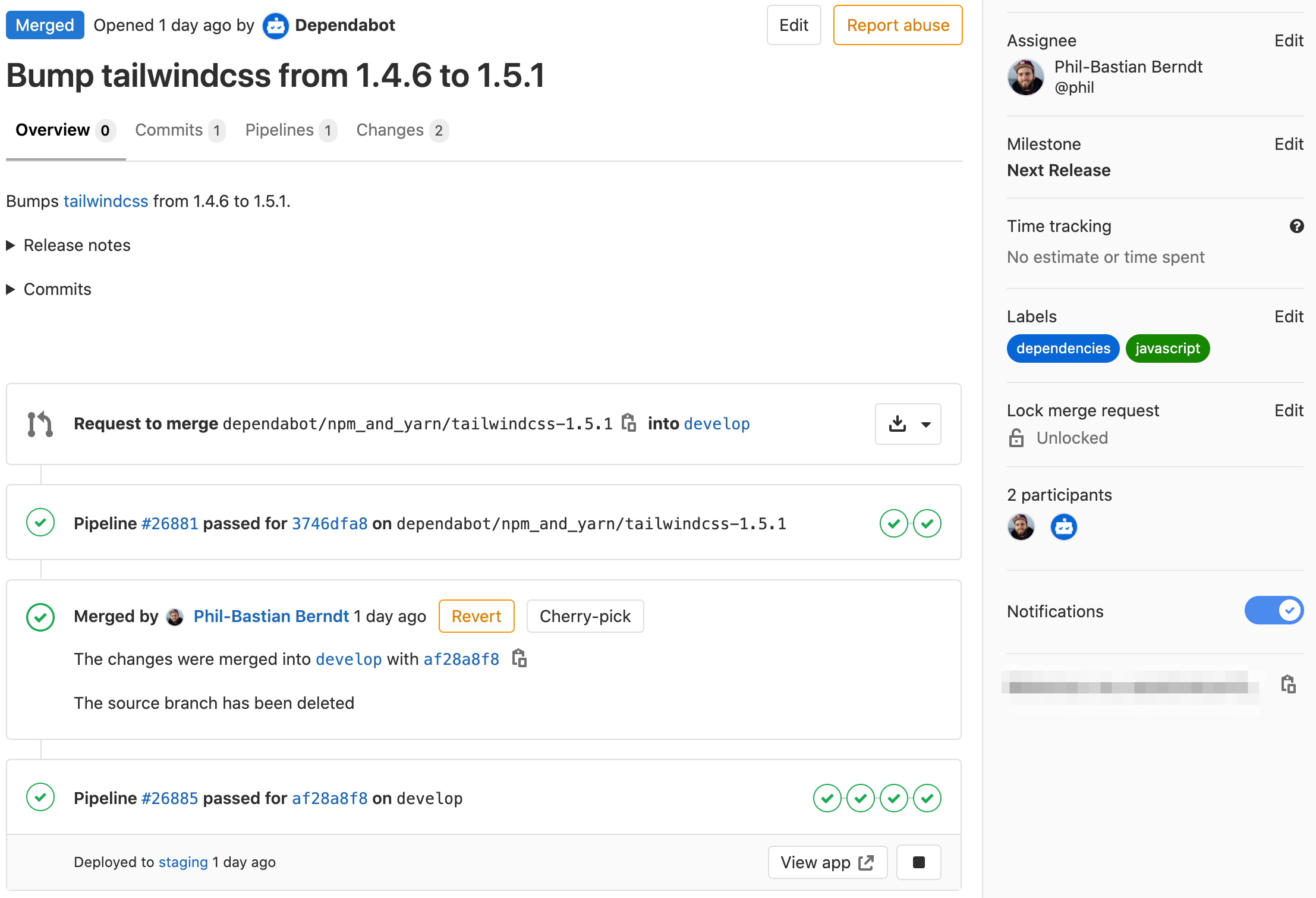
Dependabot also looks for changelogs, release notes and the commits since the last update, and links them in the merge request.
From SaaS to open source software
Dependabot started as a SaaS for projects on GitHub.com. Public projects were free, private ones cost a fee. GitHub has now bought Dependabot and is building it into the platform for good. Any kind of project can be added, and after logging in via GitHub that’s quite easy. But it only works with projects on GitHub.
The core of Dependabot is developed completely in the open, though, so you can run your own instance. That’s how we set it up on our own GitLab instance (and on GitLab.com for another customer). The relevant repositories are:
dependabot/dependabot-coreis Dependabot itself. It contains the logic that resolves and updates the dependencies of the different languages and creates the merge requests on GitHub, GitLab or Azure DevOps.dependabot/dependabot-scriptshows how to usedependabot-core, with an example setup for one or more of your own projects.
With a recent version of GitLab and Docker runners, it needs a few small adjustments to run smoothly.
Setup via GitLab
You need a fresh GitLab project and runners that use the Docker executor. A separate GitLab user for Dependabot is a good idea too. It gets access to the projects to check and creates the merge requests. The updates run as CI jobs via scheduled pipelines, which you set up for each project individually.
It doesn’t matter whether it’s GitLab.com or a private instance, by the way. We run the script on our private instance and for a customer on GitLab.com.
Set up the project
The setup needs exactly six files. The contents of dependabot/dependabot-script are the starting point, but not all of it is needed and some of it needs adjusting.
The contents of .ruby-version, Gemfile and Gemfile.lock can be copied as they are. They contain the Ruby dependencies for Dependabot. The update logic goes into a file called update.rb, with the contents of generic-update-script.rb.
The project builds its own Docker image, so you control which Dependabot version is used. That way you can automate updates of the Dependabot version too, which wouldn’t be possible with the version set in the .gitlab-ci.yml. The Dockerfile is just one line:
FROM dependabot/dependabot-core:0.118.7Another nice side effect is that the image is stored in your own registry, so you don’t depend on Docker Hub (at least for now). To build the image, the .gitlab-ci.yml gets this job. It uses kaniko, which builds images inside a container without a Docker daemon:
build:
  image:
    name: gcr.io/kaniko-project/executor:debug-v0.24.0
    entrypoint: [""]
  script:
    - echo "{\"auths\":{\"$CI_REGISTRY\":{\"username\":\"$CI_REGISTRY_USER\",\"password\":\"$CI_REGISTRY_PASSWORD\"}}}" > /kaniko/.docker/config.json
    - /kaniko/executor --context $CI_PROJECT_DIR --dockerfile Dockerfile --destination $CI_REGISTRY_IMAGE:latest --cache=true
  rules:
    - if: $CI_COMMIT_BRANCH == "master" && $CI_PIPELINE_SOURCE != "schedule"
Then add the base job for Dependabot. All the language-specific jobs inherit from it.
.dependabot:
  image: $CI_REGISTRY_IMAGE:latest
  variables:
    PACKAGE_MANAGER: $CI_JOB_NAME
    COMPOSER_MEMORY_LIMIT: -1
  before_script:
    - mkdir ~/.ssh
    - echo "$SSH_KNOWN_HOSTS" >> ~/.ssh/known_hosts
    - chmod 644 ~/.ssh/known_hosts
    - bundle install -j $(nproc) --path vendor
  script:
    - echo $PROJECT_PATH
    - bundle exec ruby ./update.rb
  cache:
    paths:
      - vendor/
For the before_script to work, create the SSH_KNOWN_HOSTS environment variable in the project under Settings, CI / CD, Variables. Its value is the ssh-keyscan result of the GitLab instance:
$ ssh-keyscan gitlab.mycompany.com
...
Dependabot also needs the following environment variables to access your projects. The GitHub token keeps it below the rate limit of the GitHub API:
GITLAB_HOSTNAME: the host name of the GitLab instance (e.g. gitlab.com or gitlab.mycompany.com)GITLAB_ACCESS_TOKEN: a personal access token of the Dependabot user from above, with theapi,read_repositoryandwrite_repositoryscopesGITHUB_ACCESS_TOKEN: a personal access token on GitHub.com with the scopepublic_repo
Now only the job definitions for the different languages are missing. .gitlab-ci.example.yml lists all the available ones, and it doesn’t hurt to add them all.
For NPM or yarn, it looks like this:
npm_and_yarn:
  extends: .dependabot
  only:
    variables:
      - $PACKAGE_MANAGER_SET =~ /(\bnpm|yarn\b)/
Since GitLab 13.0 the new syntax is preferred, though:
npm_and_yarn:
  extends: .dependabot
  rules:
    - if: $CI_PIPELINE_SOURCE == "schedule" && $PACKAGE_MANAGER_SET =~ /(\bnpm|yarn\b)/
With the languages defined, each project gets a scheduled pipeline next.
Set up the scheduled pipelines
The pipeline schedules in the Dependabot project are our overview of all projects. Each project gets a scheduled pipeline, which runs the Dependabot update script with a job for the language it uses. The interval is up to you.
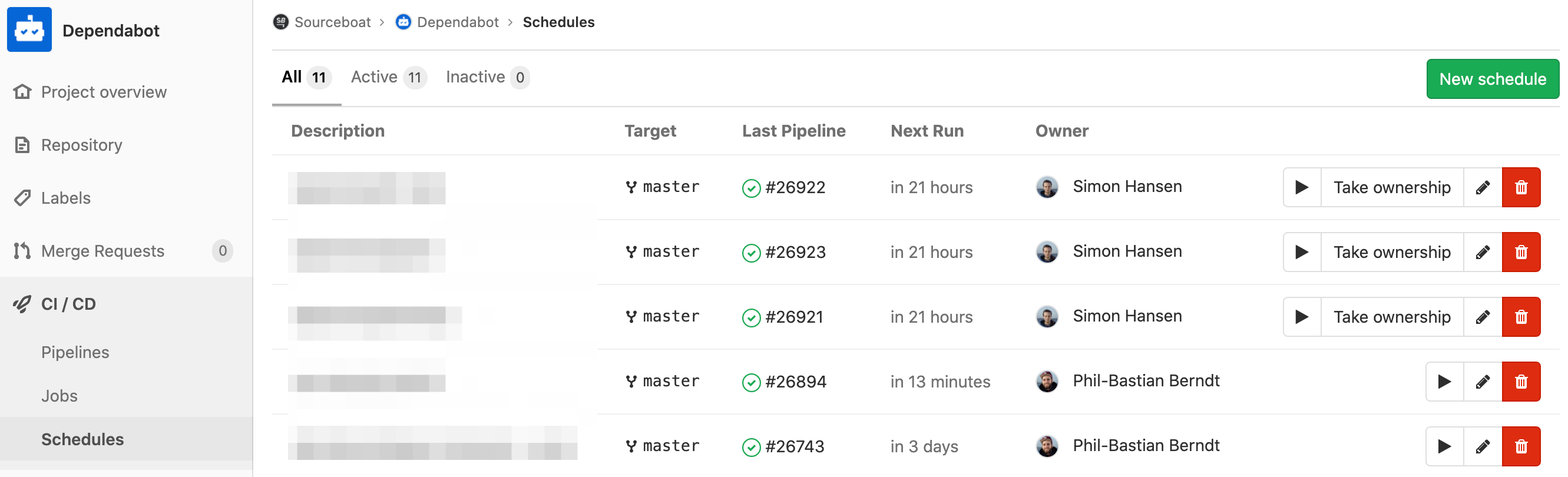
Besides a meaningful description and the interval, each schedule needs three variables:
PROJECT_PATH: the path to the GitLab project (e.g.mygroup/myproject)GITLAB_ASSIGNEE_ID: the ID of the user the merge requests are assigned toPACKAGE_MANAGER_SET: the package manager used in the project
PACKAGE_MANAGER_SET takes any of the job names from above (e.g. npm_and_yarn or composer). Several package managers can be given, separated by commas, and each one gets its own job. With docker,bundler, Dependabot can update itself as well.
If the dependency config files aren’t at the top level of the project, set the path with the DIRECTORY_PATH environment variable.
The Dependabot user needs the Developer role in each of these projects, otherwise it can’t create merge requests.
Waiting for the first merge requests
Now it’s time to wait. Dependabot checks the dependencies of the configured projects periodically and creates a merge request as soon as there’s an update. Unfortunately, it can only handle one version of a language at a time, and these versions are still hardcoded for now.
We’re also looking forward to the upcoming Dart support for our Flutter apps. Since Dart 2.8 there’s a pub outdated command, which the Dependabot integration can build on.